
Digital Eye Strain in San Francisco: Expert Solutions for Tech Professionals

Your eyes are burning. Again. You’ve been staring at code, spreadsheets, or design mockups for the past six hours, and now that familiar headache is creeping in behind your eyes. You’re squinting at your screen despite your 20/20 vision, and your neck feels like it’s made of concrete. Welcome to the club that 69% of screen users have joined: digital eye strain sufferers.
If you’re a tech professional working in San Francisco’s Marina District, Russian Hill, or Nob Hill, you’re living in the epicenter of screen-intensive work culture. While the city powers innovation through pixels and code, your eyes are paying a price that most people don’t recognize until the symptoms become unbearable. At City Optix, Dr. Jeff Rich has spent 37 years helping San Francisco professionals protect their vision while thriving in demanding digital careers.
The good news? Digital eye strain isn’t permanent damage, and the solutions are more sophisticated than “take more breaks” or “buy blue light glasses.” Let’s explore what’s really happening to your eyes and the evidence-based strategies that actually work.
Understanding Digital Eye Strain: More Than Just Tired Eyes
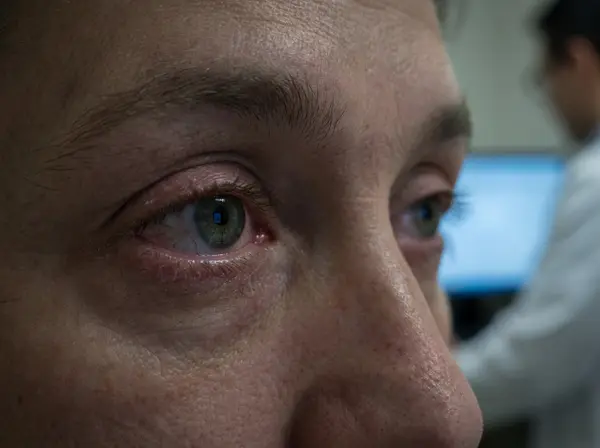
Digital eye strain—also called computer vision syndrome—encompasses a collection of eye and vision problems resulting from prolonged screen use. It’s not a single condition but rather a constellation of symptoms that develop when your visual system struggles to meet the demands of digital device use.
Think of it this way: your eyes evolved to scan distant horizons for predators and food, with occasional close-up work for tool-making or reading. They definitely didn’t evolve to stare at glowing rectangles 18-24 inches from your face for 8-12 hours daily. When you force them into this unnatural pattern, they rebel with symptoms that range from annoying to debilitating.
According to recent research, computer vision syndrome affects approximately 69% of the global population, with particularly high rates among tech professionals who spend 10+ hours daily on screens National Institutes of Health. For San Francisco tech workers—where remote work, multiple monitors, and “always-on” culture dominate—this percentage likely runs even higher.
The San Francisco Factor: Why Digital Eye Strain Hits Harder Here
San Francisco’s unique combination of factors creates the perfect storm for digital eye strain. The Bay Area employs over half a million information technology workers, with 22.5% of San Francisco’s entire workforce in tech industries—the highest concentration in the nation. These professionals typically work longer hours, manage multiple screens simultaneously, and face intense pressure to remain productive despite discomfort.
Marina District professionals working from home in converted living spaces often lack proper ergonomic setups. Russian Hill apartment lighting rarely matches office standards. Nob Hill high-rises with floor-to-ceiling windows create intense glare that standard office buildings avoid. Add in San Francisco’s notorious microclimates—shifting from fog to bright sun within blocks—and your eyes face constantly changing lighting conditions that strain visual adaptation mechanisms.
Dr. Rich sees this daily at City Optix: accomplished professionals in their 30s and 40s experiencing vision discomfort they’ve never faced before, wondering if their eyes are “going bad” when the real culprit is environmental and occupational stress on an otherwise healthy visual system.
The Real Symptoms: Recognizing What Your Eyes Are Telling You
Digital eye strain manifests through multiple symptoms, and you don’t need to experience all of them to have the condition. Dr. Rich evaluates patients reporting various combinations of these complaints:
Visual Symptoms:
- Blurred vision, especially when shifting focus between screen and distance
- Double vision or difficulty maintaining single, clear focus
- Difficulty refocusing eyes after looking away from screen
- Increased sensitivity to light
- Perception of words “swimming” or “jumping” on screen
Physical Eye Symptoms:
- Burning, itching, or gritty sensation in eyes
- Excessive tearing or paradoxically, dry eyes
- Red, irritated eyes
- Feeling of “heaviness” in eyelids
- Frequent need to rub eyes
Systemic Symptoms:
- Headaches, particularly around temples or behind eyes
- Neck, shoulder, or back pain from compensating for visual discomfort
- Difficulty concentrating or maintaining focus
- Increased sensitivity to screen brightness
- Fatigue disproportionate to actual work performed
Many San Francisco professionals normalize these symptoms, assuming they’re just “part of working in tech.” They’re not. These symptoms represent your visual system signaling that current conditions exceed its comfortable operating parameters. Ignoring them doesn’t build resilience—it just allows the problem to worsen.
Why Screens Are So Demanding: The Science Behind the Strain
Understanding why screens strain your eyes helps explain why generic advice often fails. Multiple factors combine to create visual stress:
1. Reduced Blink Rate
Normal blink rate averages 15-20 times per minute, spreading tears across your eye surface and keeping it moist. During screen use, blink rate drops to 5-7 times per minute—a reduction of more than 50%. You’re so focused on screen content that your automatic blink reflex suppresses American Optometric Association.
This matters tremendously in San Francisco’s climate. Marina District bay breezes, Russian Hill wind, and heated indoor air already stress tear film stability. Reduced blinking while staring at screens creates a perfect storm for dry, irritated eyes.
2. Accommodation Fatigue
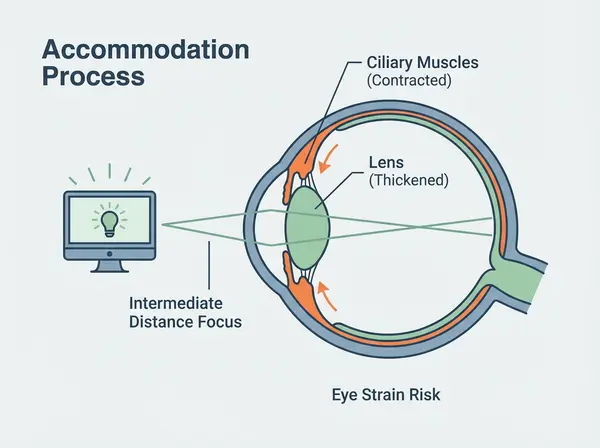
Your eyes contain tiny ciliary muscles that change your lens shape to focus at different distances—a process called accommodation. Maintaining focus at a fixed intermediate distance (like your monitor) for hours requires sustained muscle contraction, similar to holding a dumbbell at arm’s length indefinitely. Eventually, those muscles fatigue, causing focusing problems and discomfort.
Younger professionals often handle this demand better than those over 40, when the lens naturally stiffens (presbyopia). But even 25-year-olds experience accommodation fatigue after enough sustained near work—it just takes longer to develop symptoms.
3. Convergence Stress
When viewing screens at typical 18-24 inch distances, your eyes must turn inward slightly to maintain single, aligned vision. The closer the screen, the more inward rotation required. Maintaining this convergence for hours stresses the extraocular muscles controlling eye position, potentially causing eyestrain, headaches, and double vision.
Dr. Rich frequently discovers subtle binocular vision problems in tech professionals—minor eye alignment issues that cause no symptoms during brief screen use but create significant discomfort during sustained computer work. These issues often go undetected in standard vision screenings but reveal themselves during comprehensive evaluations specifically testing eye teaming and coordination.
4. Screen Characteristics
Unlike printed materials with stable, high-contrast text, digital screens present unique challenges. Pixels constantly refresh. Text doesn’t have the crisp, defined edges of printed letters. Screen glare and reflections create additional visual noise. Brightness fluctuations force constant pupil adjustments. Suboptimal contrast settings make text harder to resolve.
These factors force your visual system to work harder to extract the same information compared to reading printed materials. Over hours, this extra effort accumulates into fatigue.
5 Evidence-Based Solutions That Actually Work
Forget generic advice about taking breaks (though we’ll cover proper break technique). Here are sophisticated, optometry-backed solutions Dr. Rich implements with San Francisco tech professionals:
1. Optimized Prescription Computer Glasses
Standard distance glasses correct vision for 20 feet and beyond—perfect for driving or watching presentations, but not optimized for screen distances. Computer glasses feature prescriptions specifically calibrated for your exact working distance, typically 20-26 inches for monitors.
For Marina District professionals managing multiple monitors, Dr. Rich prescribes wider intermediate zones accommodating various screen distances simultaneously. For programmers toggling between keyboard, monitors, and reference materials, specialized lens designs provide seamless focus transitions without the head tilting required with standard progressive lenses.
The right lens coatings matter tremendously. Anti-reflective coatings eliminate screen glare and reflections that force your eyes to work harder. While research shows blue light filtering alone doesn’t reduce eye strain symptoms, anti-reflective treatments demonstrably improve visual comfort by increasing contrast and reducing glare Review of Optometry.
Computer glasses work even if you have “perfect” vision. Dr. Rich frequently prescribes low-power magnification or focusing support that reduces accommodation demand, providing relief even for patients who don’t need distance correction.
2. Workspace Ergonomics: Getting the Geometry Right
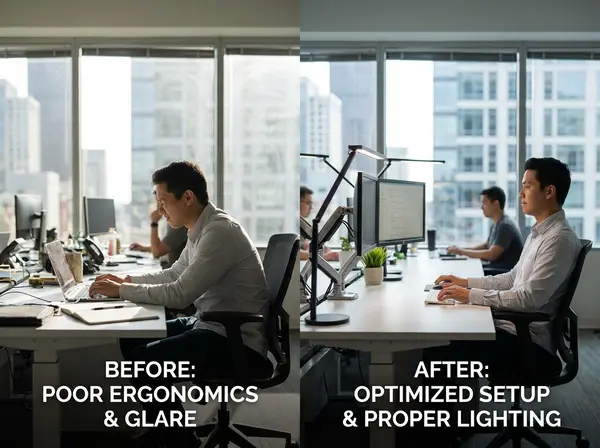
Most San Francisco professionals set up workspaces based on furniture they owned, not vision science. Proper ergonomics makes dramatic differences:
Monitor Position: Center your screen 20-26 inches from your eyes, with the top of the monitor at or slightly below eye level. This positions the viewing area 15-20 degrees below horizontal eye level—optimal for comfortable viewing and tear film distribution.
Lighting: Ambient lighting should be about half the brightness of typical office lighting. Eliminate overhead lighting directly above or behind monitors. Position desk lamps to illuminate documents without creating screen glare. For Russian Hill professionals with large windows, use sheers or blinds to diffuse intense afternoon sun.
Screen Settings: Match screen brightness to surrounding environment. Use dark mode in dim environments, light backgrounds in bright spaces. Increase text size and contrast to reduce focusing demands. Most professionals use default settings that work against visual comfort.
Secondary Monitors: Position them at equal distance and angle to avoid constant refocusing and head turning. Nob Hill executives managing 3+ monitors often develop neck problems from repetitive head rotation that proper positioning eliminates.
3. The 20-20-20 Rule (Done Properly)
You’ve heard this advice: every 20 minutes, look at something 20 feet away for 20 seconds. Most people know the rule but don’t follow it because it seems impractical during focused work. Dr. Rich helps patients implement it realistically:
Set automatic reminders. Use apps like Time Out, Stretchly, or EyeLeo that blank your screen briefly, forcing breaks. Don’t dismiss these interruptions—your productivity improves when visual fatigue decreases.
During breaks, actively focus on distant objects through windows. Looking at a wall 20 feet away doesn’t provide the same relaxation as focusing on distant buildings or landscapes. Marina District professionals near Crissy Field can glance at the bay; Russian Hill workers should focus on distant hills; Nob Hill offices with city views should utilize them therapeutically.
Combine visual breaks with standing, stretching, or brief movement. This addresses both visual and musculoskeletal strain while maintaining work momentum better than longer, less frequent breaks.
4. Artificial Tears and Dry Eye Management
That gritty, burning sensation most tech workers experience stems from dry eyes, not true eye strain. Screen-related reduced blink rates combined with San Francisco’s environmental factors create chronic dry eye that artificial tears address more effectively than “toughing it out.”
Not all artificial tears work equally well. Dr. Rich evaluates tear film quality and recommends specific formulations matching your needs. Preservative-free tears work better for frequent use. Gel-based tears provide longer relief. Some patients benefit from prescription medications addressing underlying inflammation.
For severe cases, Dr. Rich may recommend specialty contact lenses designed to trap moisture, punctal plugs that prevent tear drainage, or advanced treatments like intense pulsed light therapy targeting the root causes of chronic dry eye.
5. Comprehensive Eye Examinations Tailored for Screen Users
Standard eye exams check if you can see 20/20 on a distance chart. Dr. Rich’s evaluations for tech professionals include:
- Binocular vision assessment testing how your eyes work together during sustained near tasks
- Accommodation testing measuring focusing flexibility and endurance
- Dry eye evaluation assessing tear quality and quantity
- Digital device positioning analysis reviewing your actual work setup through photos
- Customized prescription development optimizing correction for your specific screen distances and tasks
These comprehensive evaluations detect subtle problems causing disproportionate symptoms during screen use—problems that simple refractions miss entirely. Many City Optix patients report dramatic improvement after addressing issues they didn’t know existed because previous exams never tested for them.
7 Practical Habits to Reduce Digital Eye Strain Today
Beyond professional interventions, these evidence-based habits provide immediate relief:
1. Increase Your Blink Rate Consciously
Post a reminder near your monitor: “BLINK.” It sounds silly, but conscious blinking every few minutes prevents the dry, irritated eyes that plague screen users. Make it a habit by linking it to actions you perform frequently—every time you hit “save,” blink deliberately several times.
2. Adjust Text Size and Contrast
If you’re leaning forward or squinting to read text, you’re working too hard. Increase font size, adjust contrast, and optimize display settings for comfortable reading without effort. Your screen should present information your eyes can process easily, not text requiring constant focusing effort.
3. Use Document Holders
When working between printed documents and screens, position papers on a document holder at the same distance and angle as your monitor. This eliminates constant refocusing between different planes and reduces neck strain from looking down at desk-level papers.
4. Take Phone Calls as Walking Breaks
San Francisco professionals often schedule back-to-back video calls, chaining hours of uninterrupted screen time. When video isn’t essential, take calls as walking breaks. Stroll around your Marina apartment, climb Russian Hill streets, or walk Nob Hill sidewalks while talking. Your eyes get screen rest while you remain productive.
5. Practice Palming for Deep Eye Relaxation
Rub your palms together until warm, then gently cup them over closed eyes without applying pressure. Sit quietly for 30-60 seconds, allowing complete darkness and warmth to relax eye muscles. This ancient technique provides remarkably effective relief during intense work sessions.
6. Optimize Your Evening Wind-Down
Blue light’s effects on sleep are real, though overhyped for eye strain. Two hours before bed, reduce screen brightness significantly and enable night mode/dark mode on all devices. Better yet, switch to non-screen activities—reading physical books, conversation, or gentle movement help your eyes and your sleep quality.
7. Stay Hydrated
Dehydration affects tear production and quality. San Francisco professionals chugging coffee while skipping water compound dry eye problems. Aim for adequate hydration throughout the day, recognizing that caffeine’s diuretic effects make the problem worse if you’re not compensating with water intake.
The Blue Light Debate: Separating Marketing from Science
Walk into any optical store and you’ll face aggressive marketing for blue light blocking glasses, claiming they prevent eye strain, protect retinas, and improve sleep. What does the science actually show?
Recent comprehensive reviews analyzing 17 randomized controlled trials found no significant evidence that blue light filtering lenses reduce digital eye strain symptoms compared to standard lenses. The American Academy of Ophthalmology states clearly that blue light from screens doesn’t damage eyes or cause eye strain American Academy of Ophthalmology.
This doesn’t mean blue light glasses are worthless—some patients report subjective improvement in comfort, possibly from placebo effect or from the anti-reflective coatings that typically accompany blue light filtering. But if you’re choosing between blue light filtering and anti-reflective coating with proper prescription optimization, the latter provides proven, measurable benefit.
Dr. Rich takes an evidence-based approach: he recommends anti-reflective coatings for all screen users because research demonstrates clear benefits. He discusses blue light filtering as an optional addition that some patients prefer, but he doesn’t overstate benefits the research doesn’t support. This honesty differentiates City Optix from retailers with financial incentives to push expensive lens upgrades regardless of actual benefit.’
What Actually Causes Digital Eye Strain
The primary culprits are:
- Reduced blink rate causing dry eyes
- Sustained accommodation (focusing) demand causing muscle fatigue
- Poor ergonomics forcing unnatural postures
- Uncorrected refractive errors or binocular vision problems
- Inadequate lighting and screen glare
Blue light contributes minimally if at all to these mechanisms. Managing the real causes provides dramatic relief that blue light filtering alone never delivers.
When to See Dr. Rich: Professional Intervention Signs
Most tech professionals tolerate digital eye strain symptoms far too long before seeking professional help. Schedule a comprehensive evaluation at City Optix if you experience:
- Symptoms persisting despite implementing basic strategies like breaks, ergonomic adjustments, and artificial tears
- Progressive worsening of symptoms over weeks or months
- Symptoms affecting work performance or requiring reduced screen time
- Headaches that consistently occur during or after screen use
- Double vision or difficulty maintaining focus during computer work
- Dry, gritty, or burning eyes that don’t respond to over-the-counter tears
- It’s been over a year since your last comprehensive eye exam—even if symptoms seem mild
Dr. Rich’s 37 years of experience means he’s seen thousands of tech professionals with similar complaints. He efficiently identifies whether your symptoms stem from uncorrected refractive error, binocular vision dysfunction, dry eye disease, or simply suboptimal working conditions—and prescribes targeted solutions for each underlying cause.
Many Marina District patients report that they “suffered for years” with symptoms they assumed were normal, only to discover simple solutions they never knew existed. Don’t let pride or busy schedules prevent you from addressing a problem that professional intervention can typically resolve in a single appointment.
Computer Glasses vs. Regular Glasses: Understanding the Difference
If you already wear glasses, you might wonder whether computer glasses are marketing hype or genuine solution. The answer depends on what you currently wear and how you use screens.
Distance glasses correct vision for 20 feet and beyond. Wearing them for computer work means your eyes must accommodate (focus) to bring screen images into clear focus. After hours of this sustained accommodation, fatigue develops.
Computer glasses feature prescriptions optimized for intermediate distances (20-26 inches for monitors), eliminating or reducing accommodation demand. Your eyes maintain clear focus with minimal effort, dramatically reducing fatigue during extended screen sessions.
Progressive lenses for everyday wear include distance, intermediate, and near zones. However, the intermediate zone in standard progressives is relatively narrow and positioned in the lower portion of the lens. To use it for screens, you must tilt your head back slightly—sustainable briefly, but exhausting over hours. Computer progressive lenses feature much wider intermediate zones positioned for straight-ahead viewing with monitors at proper ergonomic heights.
For Russian Hill professionals managing multiple tasks throughout the day, Dr. Rich often recommends separate glasses optimized for different activities: distance glasses for meetings and commuting, computer glasses for desk work, and reading glasses for books or close tasks. While this seems extravagant, patients consistently report that task-specific glasses provide superior comfort compared to compromising with single-pair progressive lenses.
The cost difference between suffering through eye strain daily versus investing in appropriate optical solutions is obvious when you calculate productivity losses, headache medications, and reduced quality of life. Proper computer glasses typically cost $200-400 depending on prescription complexity and lens options—less than most San Francisco professionals spend monthly on coffee.
Creating a Vision-Healthy Tech Career: Long-Term Strategies
Digital eye strain isn’t a condition you develop once, treat, and forget. It’s an occupational hazard requiring ongoing management throughout your career. Think of it like ergonomic keyboards for preventing carpal tunnel—you don’t use one for a month then return to poor technique. You integrate better practices permanently.
Dr. Rich helps San Francisco tech professionals develop sustainable vision health strategies:
Regular Comprehensive Eye Exams: Annual evaluations catch changing prescriptions, developing dry eye, and early signs of age-related conditions. Your vision demands change over time—what worked at 28 doesn’t necessarily work at 38.
Proactive Ergonomic Reviews: When changing jobs, moving, or upgrading equipment, have Dr. Rich review your setup before problems develop. Prevention beats treatment.
Prescription Updates As Needed: Don’t wait until vision problems affect work. If you notice increased squinting, more frequent headaches, or any symptom changes, schedule an evaluation. Small prescription adjustments provide disproportionate relief.
Investment in Quality Eyewear: Your glasses are occupational tools, not fashion accessories (though City Optix’s collection ensures they can be both). Quality lenses with proper coatings provide clearer, more comfortable vision than budget alternatives. This investment pays dividends in daily comfort and productivity.
Integration of Vision Breaks Into Workflow: Make breaks non-negotiable parts of your work process, not luxuries you skip when busy. Just as you wouldn’t skip saving files or running tests, don’t skip vision breaks.
The City Optix Advantage for San Francisco Tech Professionals
Dr. Rich understands tech culture because he’s served San Francisco’s tech community throughout the industry’s explosive growth. From the first dot-com boom through today’s AI revolution, he’s helped programmers, designers, product managers, and executives maintain vision health while building careers around screens.
This experience translates to practical recommendations that fit real work demands. Dr. Rich doesn’t suggest unrealistic changes like “reduce screen time to 4 hours daily”—he knows that’s impossible in your career. Instead, he optimizes your visual system for the work you actually do, with prescriptions, lens designs, and management strategies tailored to Marina District professionals, Russian Hill remote workers, and Nob Hill executives.
City Optix’s location at 2154 Chestnut Street provides convenient access for busy professionals. Quick appointments fit between meetings. Weekend hours accommodate those traveling for work during the week. Dr. Rich’s approach respects your time while ensuring thorough evaluation and effective solutions.
The curated eyewear collection includes frames sophisticated enough for client meetings while comfortable for all-day wear—because tech professionals deserve glasses that work as hard as they do without sacrificing San Francisco style.
Take Action: Your Eyes Deserve Better

You’ve built impressive skills in your field. You’ve mastered complex technologies, solved intricate problems, and contributed to innovations shaping the future. Don’t let digital eye strain undermine your abilities or quality of life.
The solution isn’t returning to paper and pencil (though your eyes would appreciate it). It’s understanding how your visual system responds to screen demands and implementing sophisticated strategies that maintain comfort and performance throughout your career.
Most digital eye strain responds remarkably well to proper intervention. Patients consistently report dramatic improvement after Dr. Rich addresses underlying causes and optimizes their visual setup for screen-intensive work. Whether you need prescription computer glasses, dry eye treatment, or simply expert guidance on workspace ergonomics, City Optix provides solutions backed by 37 years of experience serving San Francisco professionals.
Ready to eliminate digital eye strain and work comfortably for years to come? Call City Optix today at (415) 921-1444 to schedule your comprehensive evaluation, or visit us at 2154 Chestnut Street in San Francisco’s Marina District. Dr. Rich looks forward to helping you see clearly and comfortably throughout your tech career.
About the Author: Dr. Jeff Rich, OD, has provided comprehensive optometric care to San Francisco’s tech community since 1988. With over 37 years of experience, Dr. Rich specializes in vision solutions for screen-intensive professionals, combining clinical expertise with practical understanding of technology sector demands. His practice, City Optix, serves Marina District, Russian Hill, and Nob Hill professionals seeking evidence-based vision care that supports demanding careers.
FAQ SECTION
Q: What is digital eye strain and how do I know if I have it?
A: Digital eye strain (computer vision syndrome) is a group of eye and vision problems resulting from prolonged screen use. Common symptoms include blurred vision, dry or burning eyes, headaches, neck and shoulder pain, and difficulty focusing. If you experience these symptoms during or after extended computer work, you likely have digital eye strain affecting approximately 69% of screen users.
Q: Do computer glasses really help with eye strain in San Francisco?
A: Yes, prescription computer glasses optimized for screen distance (20-26 inches) significantly reduce eye strain by eliminating accommodation demand. Combined with anti-reflective coatings that reduce glare, computer glasses provide measurable relief for Marina District and San Francisco tech professionals doing sustained screen work. Dr. Rich prescribes them based on your exact working distance and tasks.
Q: How often should tech workers get eye exams for digital eye strain?
A: Tech professionals in San Francisco should have comprehensive eye exams annually, especially if experiencing any digital eye strain symptoms. These exams should include binocular vision assessment, dry eye evaluation, and prescription optimization for screen distances—not just standard distance vision checks. Annual exams catch changing prescriptions and developing problems before symptoms worsen.
Q: What’s the 20-20-20 rule and does it actually work for eye strain?
A: The 20-20-20 rule recommends taking a 20-second break every 20 minutes to look at something 20 feet away. Research supports its effectiveness for reducing digital eye strain when followed consistently. Set automatic reminders and actively focus on distant objects during breaks. Marina District professionals can use bay views; Russian Hill and Nob Hill workers should utilize cityscape sight lines.
Q: Do blue light glasses prevent digital eye strain from computers?
A: No, comprehensive research analyzing 17 studies found blue light filtering lenses don’t significantly reduce digital eye strain symptoms. Anti-reflective coatings provide proven benefit by reducing glare and improving contrast. Dr. Rich recommends evidence-based solutions including proper prescriptions, anti-reflective treatments, and ergonomic adjustments rather than relying on blue light filtering alone.
Q: Can digital eye strain cause permanent vision damage?
A: No, digital eye strain doesn’t cause permanent vision damage. However, chronic symptoms significantly impact quality of life, work performance, and comfort. The condition results from sustained visual demands exceeding your system’s capacity, not from screen exposure damaging eye structures. Proper intervention eliminates symptoms and prevents them from limiting your career.
Q: What’s the best treatment for computer vision syndrome in San Francisco?
A: The most effective treatment combines multiple strategies: comprehensive eye exam identifying underlying causes, prescription computer glasses optimized for your screen distance, proper workspace ergonomics, the 20-20-20 rule, artificial tears for dry eyes, and anti-reflective lens coatings. Dr. Rich at City Optix creates personalized treatment plans addressing your specific symptoms and work demands.
Q: Where can Marina District tech workers get help for digital eye strain?
A: City Optix at 2154 Chestnut Street in Marina District provides comprehensive digital eye strain evaluations and treatment for San Francisco tech professionals. Dr. Jeff Rich has 37 years of experience helping programmers, designers, and executives with screen-related vision problems. Call (415) 921-1444 to schedule an appointment convenient for Russian Hill, Nob Hill, and Marina residents.