

You’ve felt it by 3 PM—that gritty, tired sensation behind your eyes after hours of staring at glowing screens. Your vision blurs slightly when you glance up from your monitor. Maybe you’ve noticed headaches creeping in during afternoon video calls, or difficulty focusing when switching between your laptop and phone. Welcome to the reality of working in San Francisco’s tech-dominated economy, where the average professional spends 10-12 hours daily staring at digital screens.
The symptoms you’re experiencing have a name: computer vision syndrome, also called digital eye strain. And while you’ve probably heard blue light blamed for every screen-related ailment from insomnia to irreversible retinal damage, the science tells a more nuanced story—one that San Francisco professionals deserve to understand before investing in solutions.
At City Optix in the Marina District, Dr. Jeff Rich has helped thousands of tech workers, financial professionals, and creatives throughout Marina, Russian Hill, and Nob Hill optimize their vision for digital work since 1988. His approach combines evidence-based optometry with practical solutions tailored to San Francisco’s screen-intensive lifestyles.
This comprehensive guide separates fact from fiction about blue light, explains what computer glasses actually do, and reveals science-backed strategies for protecting your vision in our digital world.
Understanding Digital Eye Strain: More Than Just Blue Light
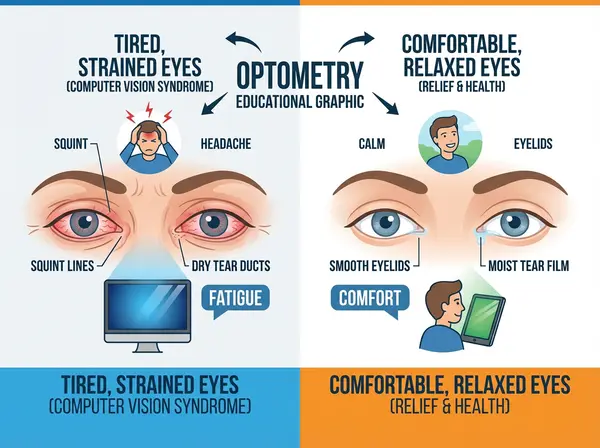
Digital eye strain affects 65-90% of computer users, making it one of the most common occupational health complaints in San Francisco’s tech sector American Optometric Association. But contrary to popular belief, blue light plays a smaller role than most people assume.
The Real Culprits Behind Screen Fatigue
Reduced Blink Rate: When you concentrate on screens, your blink rate drops from a normal 15-20 blinks per minute to just 5-7 blinks. Each blink spreads tear film across your eyes, keeping them lubricated and comfortable. Fewer blinks mean drier, more irritated eyes—the primary cause of screen-related discomfort.
Accommodation Stress: Your eye’s focusing system (accommodation) works constantly to maintain clarity at screen distance—typically 20-26 inches. After hours of sustained focus at this fixed distance, the ciliary muscles controlling your lens become fatigued, causing blurred vision and headaches. Think of it like holding your arm straight out for hours—eventually, the muscles tire.
Convergence Demand: Your eyes must turn inward (converge) to maintain single vision at near distances. Prolonged convergence creates eye muscle fatigue, contributing to eyestrain and the “pulling” sensation many Marina District professionals describe after long workdays.
Poor Ergonomics: Screen height, viewing angle, ambient lighting, and posture dramatically affect eye comfort. Yet most San Francisco tech workers have never optimized their workstation setup, creating unnecessary visual stress throughout the day.
Uncorrected Vision Problems: Many people have mild refractive errors—slight nearsightedness, farsightedness, or astigmatism—that don’t significantly impact daily life but become problematic during extended screen time. Your visual system compensates, but this constant compensation leads to fatigue.
Understanding these factors explains why computer glasses work differently than many people expect. They’re not primarily about blocking blue light—they’re about optimizing your entire visual system for digital work.
The Blue Light Controversy: Separating Science from Marketing
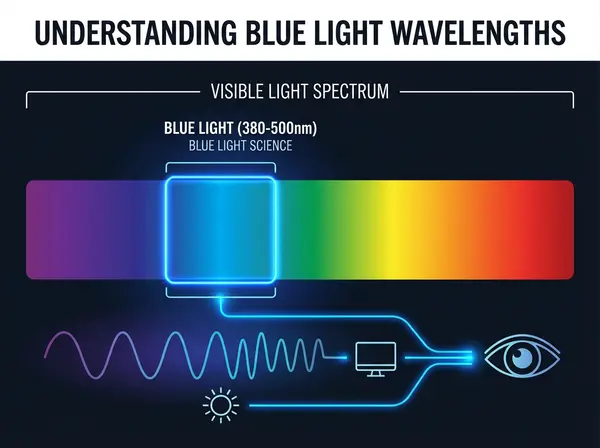
Blue light has become eyewear marketing’s favorite boogeyman, but what does the science actually say?
What Is Blue Light?
Blue light refers to high-energy visible light at the blue end of the spectrum (approximately 380-500 nanometers). It’s emitted by the sun (our primary source), LED lighting, and digital screens. Blue light plays important roles in regulating circadian rhythms, alertness, memory, and mood.
The Damage Concerns: What Research Shows
Retinal Damage Claims: Laboratory studies exposing retinal cells to intense blue light have shown potential for cellular damage. However, these studies use light intensities far exceeding anything emitted by digital devices. Multiple peer-reviewed studies have found no evidence that screen-based blue light exposure causes retinal damage in humans American Academy of Ophthalmology.
Dr. Rich explains it simply: “The amount of blue light from your laptop is a fraction of what you receive during a 10-minute walk through the Marina on a sunny day. Your eyes evolved to handle this wavelength—it’s not inherently dangerous at typical exposure levels.”
Sleep Disruption Evidence: Here the research is clearer. Blue light suppresses melatonin production, signaling your brain to stay alert. Evening screen exposure can delay sleep onset and reduce sleep quality. A 2023 meta-analysis found that blue light exposure within 2 hours of bedtime significantly affected circadian timing Chronobiology International.
Eye Strain Claims: This is where marketing diverges most dramatically from science. A comprehensive 2023 Cochrane review—the gold standard of medical evidence—examined randomized controlled trials comparing blue light filtering lenses to standard lenses. The conclusion? Blue light filtering glasses “may not reduce eye strain symptoms with computer use over short-term periods” compared to non-filtering lenses Cochrane Database of Systematic Reviews.
The eye strain you feel after screen time comes primarily from accommodation stress, reduced blinking, and poor ergonomics—not blue light exposure.
What Computer Glasses Actually Do (And Why They Work)
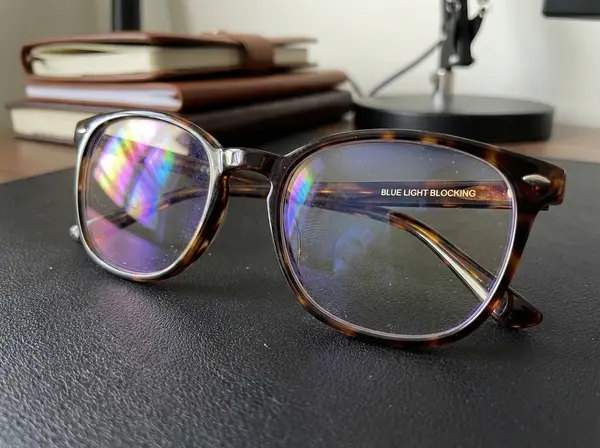
Despite the oversold blue light narrative, computer glasses genuinely help many Russian Hill and Nob Hill professionals who work at screens all day. Here’s what they actually optimize:
1. Specialized Focal Distance Optimization
Standard progressive lenses or single-vision distance glasses aren’t designed for computer work. Computer glasses provide a customized prescription optimized specifically for your screen distance—typically 20-26 inches—making sustained focus effortless rather than fatiguing.
Think of it like specialty shoes: running shoes, dress shoes, and work boots all protect your feet, but each serves specific purposes. Computer glasses are your “work boots” for digital environments.
2. Anti-Reflective Coatings
Quality computer glasses feature multi-layer anti-reflective coatings that eliminate glare from overhead lighting, windows, and the screen itself. This reduces visual “noise” requiring your brain to work harder distinguishing actual content from reflections.
For Marina District professionals working in naturally lit offices with bay views, anti-reflective coatings prove particularly valuable by managing the extreme contrast between bright windows and darker screens.
3. Optimal Lens Design for Intermediate Vision
Computer-specific lens designs provide wider fields of clear vision at intermediate distances compared to progressives, which have relatively small intermediate zones. This reduces the head tilting and repositioning many people unconsciously do to find the “sweet spot” in their progressives.
4. Slight Magnification
Even people with perfect 20/20 distance vision benefit from slight magnification for sustained near work. Computer glasses often include subtle magnification (typically +0.50 to +1.25 diopters) that relaxes accommodation, reducing the effort required to maintain focus.
Dr. Rich often prescribes this for Nob Hill executives in their 30s and early 40s who don’t yet need reading glasses but experience afternoon eye fatigue during screen work.
5. Blue Light Reduction (As a Bonus, Not Primary Function)
Yes, computer glasses often include blue light filtering—but it’s the cherry on top, not the sundae. The 20-40% blue light reduction helps some people with sleep quality when working late but won’t significantly affect daytime eye strain.
7 Signs You Need Computer Glasses in San Francisco
Not everyone requires specialized computer eyewear. Consider computer glasses if you experience:
1. Afternoon Vision Blur
Your vision is sharp in the morning but becomes progressively blurrier or hazier as the workday continues, especially when looking at screens. This indicates accommodation fatigue—your focusing system tiring from sustained near work.
2. Frequent Headaches Timing with Screen Use
Headaches developing during or shortly after extended computer work, particularly concentrated around your temples, forehead, or behind your eyes. These differ from migraine or tension headaches by their direct correlation with screen time.
3. Neck or Shoulder Discomfort
Russian Hill tech workers often unconsciously tilt their heads or lean forward to find clear vision through progressive lenses not optimized for screens. This postural compensation creates musculoskeletal pain that disappears with properly prescribed computer glasses.
4. Difficulty Refocusing
You look up from your screen and experience 1-2 seconds of blur before distance vision clears, or vice versa when returning to your monitor. This “accommodation lag” suggests your focusing system is working too hard.
5. Eye Fatigue or Discomfort
Your eyes feel tired, heavy, dry, or irritated specifically after screen time. While ergonomics and breaks help, specialized glasses optimize the entire visual pathway for digital work.
6. Reduced Productivity
You notice difficulty concentrating during afternoon video calls, slower reading comprehension on screens, or increased errors during detail work—all symptoms of visual system fatigue.
7. Existing Bifocals or Progressives Feel Inadequate
You’re over 40 and find your progressive lenses don’t provide comfortable computer vision, requiring awkward head positioning or constant focal distance adjustments during digital work.
Beyond Glasses: The Complete Digital Eye Protection Strategy
Computer glasses are one tool in a comprehensive approach to screen time eye health. Dr. Rich recommends these evidence-based strategies for Marina District professionals:
The 20-20-20 Rule
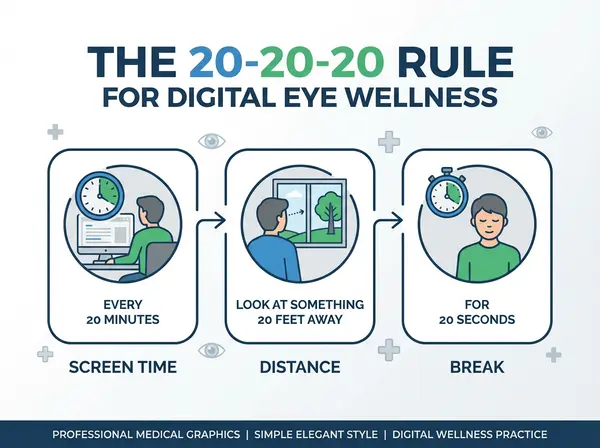
Every 20 minutes, look at something 20 feet away for at least 20 seconds. This breaks the accommodation lock, allowing your focusing muscles to relax. Set phone reminders if you lose track of time during focused work.
For San Francisco office workers, this might mean glancing out your window toward the bay or down the hallway every 20 minutes. The brief visual break makes a dramatic difference in end-of-day comfort.
Optimize Your Workstation Ergonomics
Screen Position: Your monitor’s top should sit at or slightly below eye level, with the screen 20-26 inches from your eyes—roughly an arm’s length. Nob Hill executives often have oversized monitors positioned too close, creating unnecessary visual stress.
Lighting: Position screens perpendicular to windows to minimize glare. Use indirect lighting rather than harsh overhead lights. San Francisco’s natural light is beautiful but creates extreme contrast—adjustable blinds or curtains help manage brightness.
Screen Settings: Increase text size to comfortable reading levels. Adjust screen brightness to match your surrounding environment (dimmer in evening, brighter in daylight). Enable night mode after sunset to reduce blue light exposure.
Increase Your Blink Rate Consciously
Post reminder notes saying “BLINK” near your monitor. It sounds simplistic, but consciously blinking more frequently prevents the dry eye symptoms plaguing so many Russian Hill tech workers. Consider using artificial tears designed for computer users if you still experience dryness.
Address Underlying Dry Eye
San Francisco’s climate, air quality, and screen-intensive culture create a perfect storm for dry eye disease. Dr. Rich evaluates tear film quality during eye exams, prescribing appropriate treatments ranging from artificial tears to prescription medications when necessary.
Get Annual Comprehensive Eye Exams
Uncorrected minor vision problems you don’t notice in daily life become magnified during sustained screen work. Annual exams at City Optix ensure your prescription remains optimal for your visual demands, catching changes before they cause symptoms.
Consider Computer-Specific Prescriptions
Even if you don’t wear glasses normally, a mild prescription optimized for screen work can dramatically reduce fatigue. Dr. Rich frequently prescribes computer glasses for Marina District professionals with “perfect” vision who experience afternoon eye strain.
Computer Glasses Options at City Optix
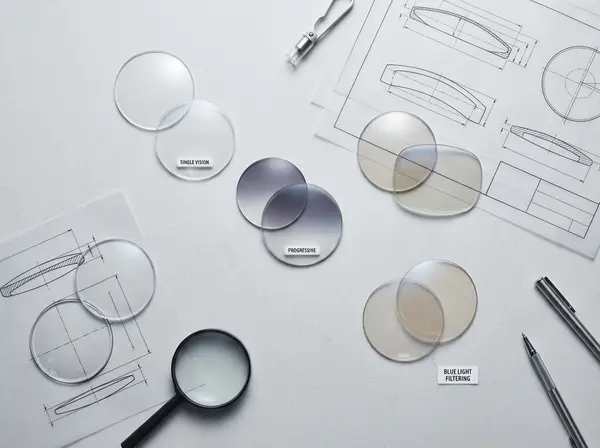
City Optix offers several computer eyewear solutions tailored to San Francisco professionals’ diverse needs:
Single Vision Computer Glasses
Designed exclusively for intermediate screen distance (18-30 inches). Ideal for dedicated computer workstations or for younger professionals not yet needing reading glasses but experiencing digital eye strain. These provide the widest field of clear vision at computer distance.
Computer Progressive (Office) Lenses
Multi-focal lenses optimized for near and intermediate distances—perfect for work requiring frequent shifting between computer screens and desk documents. Unlike standard progressives designed primarily for distance and near, these prioritize the intermediate and near zones.
Nob Hill attorneys and financial analysts who alternate between screens and paperwork particularly appreciate these lenses.
Blue Light Filtering Lenses
Available as an add-on to any prescription, these lenses filter 20-40% of blue light while maintaining color accuracy. Best for people concerned about evening screen use affecting sleep quality rather than daytime eye strain prevention.
Anti-Fatigue Lenses
Designed for people under 40 not yet needing reading glasses but experiencing digital eye strain. These lenses incorporate slight magnification in the lower portion, relaxing accommodation during near work while maintaining clear distance vision.
Marina District tech professionals in their 30s find these particularly beneficial for 10-12 hour workdays.
Custom Prescription Computer Glasses
For complex prescriptions or specific occupational needs, Dr. Rich designs custom solutions considering your exact screen distance, working posture, visual demands, and individual visual system. This personalized approach creates optimal results for challenging cases.
The City Optix Difference: Personalized Computer Vision Solutions
Chain optical stores sell computer glasses using standardized recommendations: “Screen distance? Here’s your power.” Dr. Rich’s approach at City Optix is fundamentally different.
Comprehensive Work Analysis
During your consultation, Dr. Rich asks detailed questions about your actual work environment: How many monitors do you use? What’s your typical screen distance? Do you reference documents? What’s your lighting situation? How many hours daily are you on screens?
This information guides precise prescription calculations and lens recommendations tailored to your real-world needs, not generic formulas.
Occupational Vision Assessment
Beyond standard eye exams, Dr. Rich evaluates your visual system under conditions mimicking your work environment—testing at your specific screen distance, evaluating accommodation and convergence abilities, assessing how your eyes work together during sustained near work.
Russian Hill and Nob Hill professionals appreciate this thorough approach that considers their complete visual demands rather than just reading a chart.
Trial and Refinement
Dr. Rich understands that computer glasses require fine-tuning. After you’ve worn your new glasses for a week or two, he welcomes you back for adjustments ensuring optimal comfort and performance. This follow-up service—complimentary for City Optix patients—makes the difference between glasses that “kind of help” and glasses that transform your workday comfort.
Quality Lens Materials and Coatings
Computer glasses are tools you’ll use 8-12 hours daily. Dr. Rich uses premium lens materials with multi-layer anti-reflective coatings, scratch-resistant treatments, and optical clarity far exceeding mass-market alternatives. For professional eyewear used this extensively, quality genuinely matters.
Lifestyle Recommendations for San Francisco’s Tech Community
Beyond occupational eyewear, Dr. Rich offers lifestyle guidance for maintaining long-term eye health in screen-intensive careers:
Outdoor Time
Emerging research suggests time outdoors—with its bright, varied lighting and distance viewing—provides protective effects against myopia progression and general eye health benefits. Marina Green, the Presidio, and the countless other green spaces throughout northern San Francisco offer accessible options for visual system recovery.
Dr. Rich recommends 30-60 minutes daily outdoors when possible, particularly for those working entirely indoors.
Screen-Free Evening Hours
Aim for at least one hour screen-free before bed. Read physical books, practice hobbies not involving screens, or enjoy San Francisco’s evening dining and entertainment scenes. This break supports both sleep quality and visual system recovery.
Nutrition for Eye Health
Omega-3 fatty acids (abundant in salmon, sardines, and walnuts), lutein and zeaxanthin (found in leafy greens), and adequate hydration all support tear film health and general eye function. San Francisco’s abundance of fresh, high-quality food makes this easy to implement.
Regular Exercise
Physical activity improves circulation, including blood flow to eyes, and reduces risk factors for diseases affecting vision. Marina District residents have countless options from waterfront running to hill workouts that double as eye health maintenance.
When to See Dr. Rich at City Optix
Schedule a computer vision consultation if:
-
- You spend 6+ hours daily on screens and experience any discomfort symptoms
-
- Your current glasses don’t feel optimal for computer work
-
- You’re over 40 and struggling with screen focus despite reading glasses or progressives
-
- You experience headaches, neck pain, or vision blur during or after screen time
-
- Your job demands have increased screen time and your eyes haven’t adjusted comfortably
-
- You want personalized recommendations for optimizing your digital workspace
Dr. Rich welcomes both existing patients and new clients from Marina District, Russian Hill, Nob Hill, and throughout San Francisco seeking expert guidance on protecting their vision in our digital world.
The Bottom Line: Science-Based Vision Protection
Computer glasses work—but not for the reasons most marketing claims. They optimize your entire visual system for digital work through specialized prescriptions, anti-reflective coatings, and designs specific to screen distances. Blue light reduction is a minor benefit, not the primary mechanism.
Combined with ergonomic workspaces, regular breaks, proper lighting, and annual eye exams, computer glasses help San Francisco professionals maintain comfortable, productive vision throughout their careers.
At City Optix, Dr. Jeff Rich provides honest, science-based recommendations free from marketing hype. His 37 years serving Marina District, Russian Hill, and Nob Hill residents means he understands the specific visual demands of San Francisco’s tech-driven economy and can tailor solutions to your exact needs.
Ready to experience screen time without the strain? Visit Dr. Jeff Rich at City Optix, located at 2154 Chestnut Street in San Francisco’s Marina District. Call (415) 921-1444 to schedule your computer vision consultation and discover personalized solutions for protecting your eyes in our digital world.
About the Author: Dr. Jeff Rich, OD, has provided comprehensive optometric care and specialty vision solutions to San Francisco’s Marina District community since 1988. With over 37 years of experience in occupational vision and computer eyewear, Dr. Rich specializes in helping tech professionals, executives, and creatives optimize their vision for digital work demands. His practice, City Optix, serves discerning clients throughout Marina District, Russian Hill, Nob Hill, and northern San Francisco neighborhoods.
FAQ SECTION
Q: Do computer glasses with blue light protection really work?
A: Computer glasses work primarily through specialized prescriptions optimized for screen distance (20-26 inches), anti-reflective coatings reducing glare, and lens designs for intermediate vision—not primarily blue light blocking. Research shows blue light filtering doesn’t significantly reduce digital eye strain, but the other features genuinely improve comfort during extended screen time.
Q: What’s the difference between computer glasses and regular glasses?
A: Computer glasses feature prescriptions optimized specifically for 20-26 inch screen distance, wider intermediate vision zones, anti-reflective coatings, and often slight magnification to relax eye focusing muscles. Regular glasses prioritize distance vision or general near vision, not the specific intermediate distances used for computer work.
Q: How much do computer glasses cost in San Francisco?
A: Quality computer glasses at City Optix typically range from $200-500 depending on prescription complexity, lens design, frame selection, and coatings. This investment provides specialized eyewear designed for 8-12 hours daily use, with significant improvements in comfort and productivity for Marina District professionals with screen-intensive careers.
Q: Can I wear computer glasses all day?
A: Computer glasses are optimized for intermediate screen distance (20-26 inches), so they won’t provide optimal vision for driving, watching TV, or other distance tasks. They’re designed specifically for computer work. For all-day wear, ask Dr. Rich about office progressive lenses that balance intermediate and distance vision needs.
Q: Do I need computer glasses if I have perfect vision?
A: Yes, even people with perfect 20/20 distance vision can benefit from computer glasses. Slight magnification and specialized design reduce accommodation stress during sustained near work, preventing the afternoon eye fatigue many Marina District tech workers experience despite having “perfect” vision for distance tasks.
Q: What causes computer eye strain besides blue light?
A: The primary causes of computer eye strain are reduced blink rate (causing dry eyes), accommodation stress from sustained focus at fixed distances, convergence demand from eyes turning inward, poor workstation ergonomics, inadequate lighting, and uncorrected minor vision problems that become symptomatic during extended screen use.
Q: Where can I get computer glasses fitted properly in San Francisco?
A: City Optix at 2154 Chestnut Street in San Francisco’s Marina District specializes in computer vision solutions. Dr. Jeff Rich provides comprehensive work environment analysis, occupational vision assessment, and personalized prescriptions tailored to your specific screen distance and visual demands, with follow-up refinement ensuring optimal results.
Q: How do I know if I need computer glasses or just better ergonomics?
A: Schedule a comprehensive eye exam with Dr. Rich at City Optix to evaluate your visual system during computer work conditions. Many people benefit from both improved ergonomics and specialized computer glasses. Dr. Rich assesses accommodation, convergence, and visual comfort at your working distance to provide personalized recommendations.